Product Daily Limit Used per Product
The Product Daily Limit Used per Product report shows how much of a product’s booking limit has been used over a selected date range. It helps you monitor booked product volume day by day and quickly identify when a product is nearing or exceeding its configured capacity.
This report is based on appointments that were booked within the selected date range, using the location’s configured product limit preferences. If you have access to multiple locations, they will all be reflected within this report.
Use this report to:
- Track daily booked quantity for a specific product
- Monitor product capacity usage across multiple days
- Identify overutilization or unused capacity
- Support planning decisions for product intake or shipment scheduling.
Filters
Use the filters at the top of the report to control what data is displayed.
| FILTER | WHAT IT DOES |
|---|---|
| Product | Select the product you want to review. |
| From | Set the start date for the report. |
| To | Set the end date for the report. |
| Reset | Clears your selected filters and restores the default view. |
| Search | Runs the report using the selected filter values. |
How to Read the Report
The report displays one column for each date in the selected range, plus a Total column at the end of the row and column.
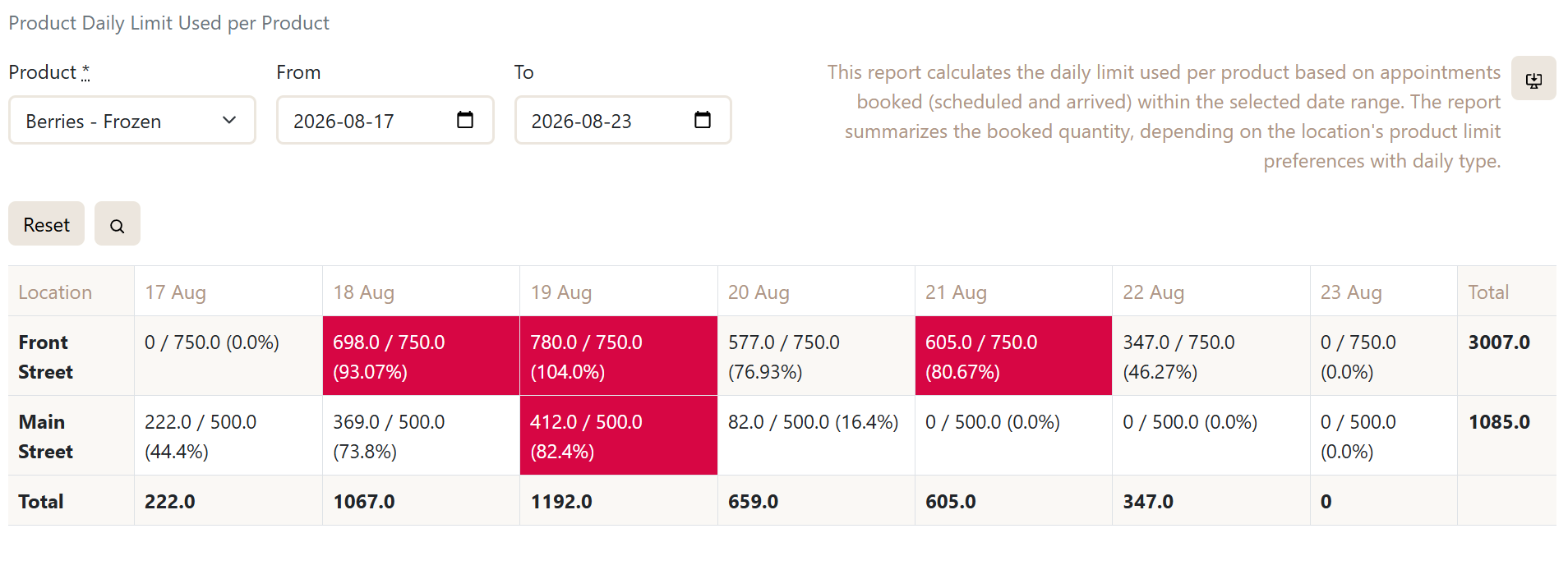
Each daily value is shown in this format:
Booked Quantity / Limit (Percent Used)
For example:
15.0 / 20.0 (75%)
This means:
15.0 = total booked quantity for that product on that day 20.0 = the configured daily product limit 75% = the percentage of the daily limit that was used
If your percentage is above 80%, the cell colour will change to red, reflecting you are near or over your product limit for that day. It is possible to be over 100% due to internal overrides.
If no limit is configured for that product/day type, the limit may appear as N/A.
For example:
15.0 / N/A (0%)
This means:
There was booked quantity recorded No daily limit was available for comparison Percentage used could not be meaningfully calculated
When to Use This Report
This report is especially useful when you want to:
- Review daily usage for a single product
- Check whether booking volume is aligned with configured product limits
- Investigate days where product capacity may have been heavily used
- Compare booked quantities across a week or custom date range
Notes
- This report is product-specific and displays one selected product at a time.
- Results depend on how product limits are configured for the location.
- Limit values may vary based on the location’s daily type settings.
- If no limit is configured, the report will still show booked quantity but may display N/A for the limit.
- Keep an eye on product limit usage to better manage scheduling capacity, avoid overbooking, and maintain smoother operational flow.